
How can I share dotphoto albums with QR codes?
- Tap on the dotphoto album you want to share.
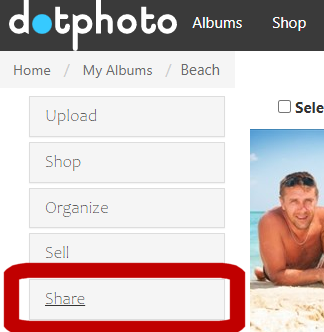
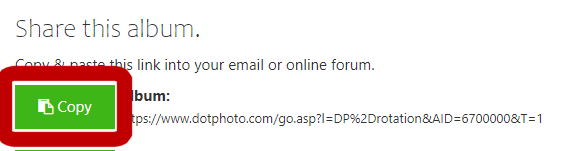
- Tap on Share in the left menu and choose, and tap the green Copy button next to the Album. You have copied the link to share that album.
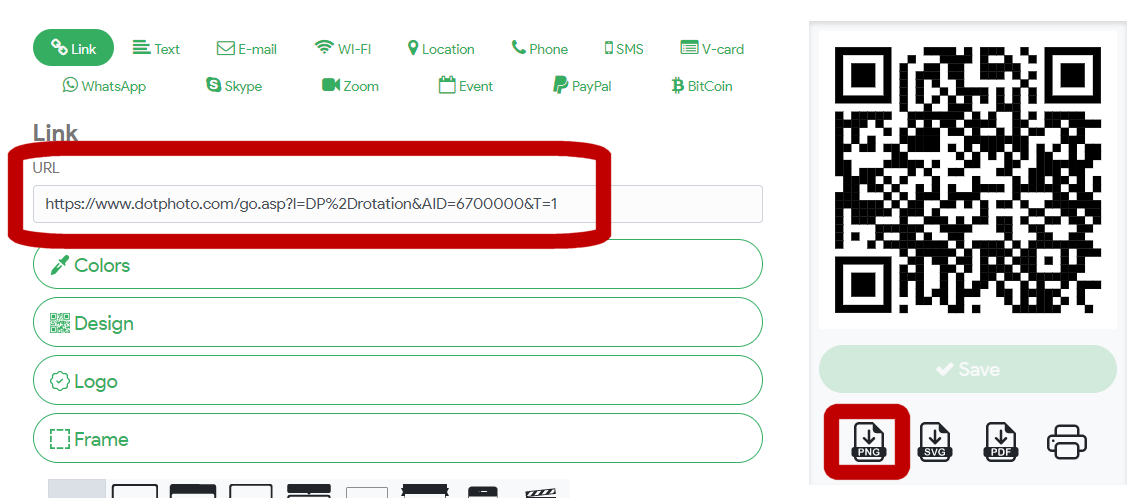
- Go to www.forqrcode.com and paste in the link. Copy the QR code, and paste it into your email, blog, newsletter or business card.
An illustrated procedure: How can I share dotphoto albums with QR codes?
- Tap on the dotphoto album you want to share.

- Tap on Share in the left menu and choose, and tap the green Copy button next to the Album. You have copied the link to share that album.
- Go to www.forqrcode.com and paste in the link. Copy the QR code, and paste it into your email, blog, newsletter or business card. Try scanning the QR code below: it will take you to the dotphoto album.

 Getting more out of dotPhoto