Toys R Us Slideshow

iPhone 8, 8Plus, and X coversGenerations of us have shopped at Toys R Us. We have marveled at the variety of toys, gaped at the displays, bought bikes and beds, and argued with our children over whether they really needed the latest toy trend.

When we heard Toys R Us was closing for good, we thought, “There may never be another retail store like this. Let’s take some pictures while we still can.” So here is our homage to Toys R Us, the generations who loved it, and the time we spent dreaming there.

How to re-arrange photos in a dotphoto album

How to rearrange photos in an albumTo re-arrange the order of photos in any dotphoto album, choose the Organize menu on the left and then Sort Album. Under the Sort Album, you can automatically sort by photo title, date or upload date — or you can manually drag-and-drop photos to whatever order you want.

This is particularly helpful when making a dotphoto slideshow.

More info on re-arranging photos

How to make a dotphoto slideshow

Dotphoto Safeguards Your Data.

iPhone 8, 8Plus, and X coversThis week’s news has devoted a great deal of time to the scandal in which Internet data was sold and shared with political campaigns. Some of you have called to ask about dotphoto’s data policies. If you missed this news cycle, here is a simple explanation:

dotphoto does not sell data to anyone because we have a different business model. We sell a photo service that includes:
  • Safeguarding your data. Your data is yours. We don’t sell your data unless you ask us to sell your photos, and then we send you money.
  • No ads among your photos.
  • 8 cent prints, $49 off premium books, and wholesale prices on other customized photo goods
  • Free shipping on orders of $10 or more (That’s huge.)
  • Original storage of the entire image up to 20MB (We don’t down-size your photos.)
  • Unlimited storage
  • Satisfaction guaranteed
  • You can call us on the phone. If you don’t get us instantly, we usually call back in an hour.
  • Lots more that you can read about here — and we’re adding to this list all the time.
dotphoto is a straightforward photo service that — for less than a cup of Starbucks a month — provides more value than free services and never sells your data.

Link to dotphoto & get $5 for every join!

Dog TwinningEmail us at paylink@dotphoto.com with your dotphoto login and the subject “Send my dotphoto link!”
We will create a code that you can use in a link like this:

https://www.dotphoto.com/?source=YOURNNAMEHERE

Use that link on your web site to direct people to dotphoto.

Our system tracks the origin of people who join dotphoto, and will pay you $5 for each new member.

How to place large orders on dotphoto

iPhone 8, 8Plus, and X coversOne of the most frequent questions our customers ask is, “How large is the largest order?” About 1000 photos at a time, which, if you’re a club member and use the Reader Reward in every newsletter, only costs 7.6 cents per 4×6 print including shipping.

ADDING ALBUMS TO YOUR CART
Most large orders include adding entire albums at a time. From the album page, note that each album tells you how many photos are in the album in the upper right corner of the first photo. In the example here, one album has 135 photos and another has 15 photos.

  1. Select the albums you want to add by tapping the select box under the album.
  2. Tap the Shop button in the left column
  3. If you are ordering prints, tap the Prints button and the size of the print you want.

ORGANIZING YOUR PHOTOS
If you would like special organization for your photos, you can label them with numbers, codes or names, and then use the back-printing procedure to print those codes on the back. The codes let you sort and organize as your photos as you like.  How to use Back-Printing

CHANGING THE TITLES ON THE BACK OF YOUR PHOTOS
After you upload your photos, you can change the titles that will appear on the back of your photos if you have turned on back-printing.  How to edit the titles of your photos

More info on placing large orders up to 1000 photos at a time

Tesla in Space Slideshow

iPhone 8, 8Plus, and X coversOn Tuesday, February 5, 2018 SpaceX’s Falcon Heavy rocket lifted off from Kennedy Space Center in Florida.

Instead of the usual concrete block for a test payload, the Falcon Heavy launched Elon Musk’s Tesla Roadster and a mannequin called Starman toward Mars.

Two and a half minutes after lift-off, the booster rockets returned for nearly simultaneous vertical landings. The event was visually spectacular.

This photo collection follows lift-off to the last image of Starman and his Tesla as he begins his billion year journey to Mars, the asteroid belt, and around the sun.

Free Mail-4-Me cards for Valentine’s Day

iPhone 8, 8Plus, and X coversWe’re so sure that you’ll love dotphoto’s Mail-4-Me Cards that we’re giving you one free – just in time for Valentine’s Day!

Here’s how they work:

  • Customize a card with your photos on the cover and inside.
  • Add your message and signature.
  • Add the mailing address and place your order.
  • dotphoto prints, seals, stamps and mails your card for only $1.99
  • Step-by-step instructions and 3-minute video

Get your free Mail-for-Me card: order and pay for your card, then email FreeM4Mcard@dotphoto.com with your dotphoto account. We will add a $1.99 credit to your account that you can use any time in the next year. Applies only to Club, Family & Pro members. 1 credit per account.

Love quotes for Valentine’s Day

How to print a panoramaFor your Valentine’s consideration…

The grand essentials of happiness are: something to do, someone to love, and something to hope for. – Joseph Addison

The way to love anything is to realize that it might be lost. – G.K. Chesterton

Only one life that soon is passed; only what’s done with love will last. – Sign over mantle quoted by Brian Tracy

The supreme happiness of life is the conviction that we are loved. – Victor Hugo

Looking back, I have this to regret, that too often when I loved, I did not say so. – David Grayson

More Love Quotes

What is the best resolution for printing?

How to print a panoramaThe best printable resolution is 300 dots per inch.

Extremely low resolution will look “blocky” or pixelated. Imagine only 4 dots per inch: you would see four colored squares instead of a picture. When there are many pixels, your mind blends the tiny blocks together to form an image.

At 300 dots per inch, the best resolution for a 4×6 print, then, is 1200 x 1800. This dotphoto FAQ provides optimal resolution for popular prints and poster sizes.

More on print resolutions

How to take a good photo

When I asked my wife what she would like to learn in a dotphoto newsletter, she said, “How to take a good photo!” Beauty is subjective, but there are a few rules that can help those of us who are not full-time photographers. For instance, avoid the desire to center every subject. Joshua Cripps does a nice job of explaining and illustrating his 7 Photography Tips for Amazing Photos in this 7-minute video.

  1. Fill the frame
  2. Simplify and exaggerate
  3. Don’t center your subject
  4. Create depth
  5. Connect the dots
  6. Perspective is EVERYTHING
  7. Lighting is even more important
7 Powerful Photography Tips for Amazing Photos
7 Photography Tips for Amazing Photos

The Best Ways to Archive Photos in 2018

In the bleak midwinter, our thoughts turn to “Where will my photos be in 15 years?” Well, maybe not, but perhaps we should consider the question because most of us give scant thought to protecting our photos until after a computer breaks or a house floods or someone passes away.

This dotphoto newsletter is devoted to various photo preservation strategies and examines the cost of each. Some combination of these techniques is probably right for you.

Backing Up your Photos Online

Naturally, we think online backup to the cloud is a terrific idea because it is historically the most reliable storage. However, the cloud has its problems. Most photo web sites downsize photos after a week and again after a year.  Facebook doesn’t work with anything over 100K, so your archived photos may be much smaller than you remember them. At dotphoto, we do NOT downsize photos.  dotphoto Club members get unlimited storage and the full size image up to 20MB, which is a very large photo.

dotphoto’s cloud storage is backed up across multiple data centers and is extremely secure, but we recommend that you also keep a copy locally because, well, it’s the Internet. For instance, just two weeks ago, Intel announced a security problem with all of its processors. That problem is probably patched by operating systems, but even fans of technology know that multiple backups are prudent.
Free Downloads of your dotphoto Albums
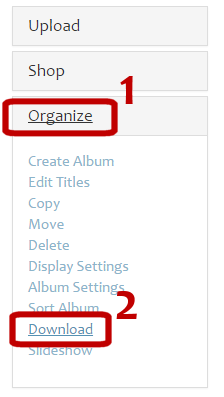
dotphoto Club and paid plan members can download their albums free at any time. Just go into an album, click on Organize and choose Download. We offer this service because dotphoto is a photo management service — not a photo printing service. We also happen to have the lowest prices on prints in the industry, but dotphoto takes a wider view of your photo needs.  More on free downloads

Value prints!
The dotphoto cart can handle about 1000 different prints at a time, and you can even add a message to the back of your prints. Shipping is free for Club members over $10, so 1000 prints with the Readers Reward Discount (the coupon code this week is BACKUP) would only be only $76 or 7.6 cents per print delivered. (This is even less than so-called “free print” services that limit charge over a certain number of prints per month and tack on huge shipping charges.)
Value booksValue books! (Sometimes less expensive than prints)
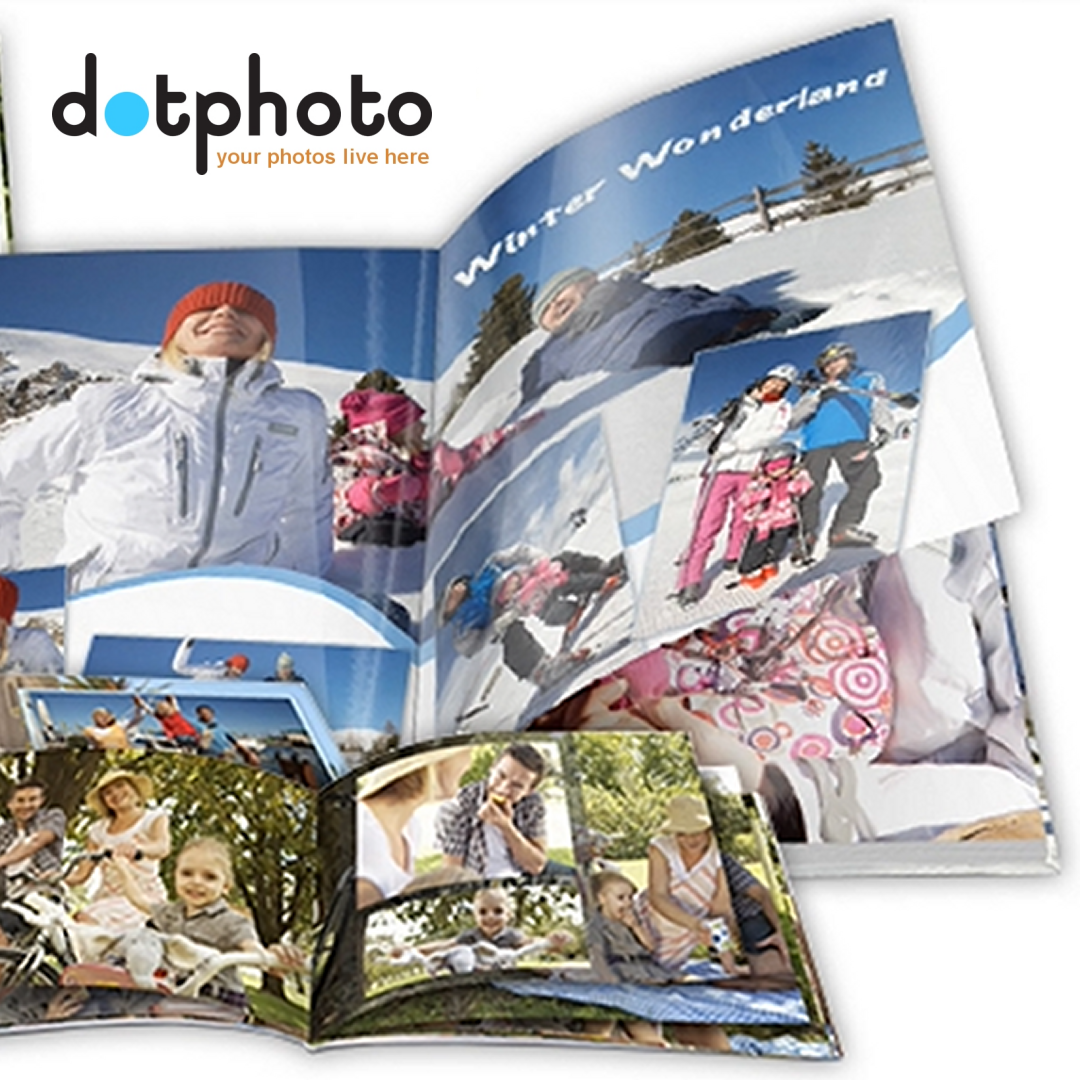
Many dotphoto books can include up to 154 pages, so, if you put 4 photos on a page, you’ll archive about 600 photos per book. With dotphoto’s SAVE49 coupon code for books, you’ll save $49 on every book order of $79 or more (premium books as low as $30), and you can split multiple books into multiple orders to use the coupon again. Depending on the choices that you make for your book — cover type, paper type, book size — you can get a better value and experience with a book. How to make a photo book
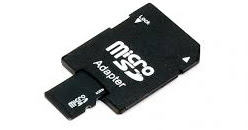
SD CardSD Cards
We stopped using CDs and DVDs years ago because the devices are getting increasingly hard to find. You may have a photo CD in the future, but nothing to read it with. SD cards are used in millions of computers and cameras, and SD cards fit neatly into storage boxes. If you don’t want to download all your albums, dotphoto offers a customized service that backs up your photos to SD cards and sends them by mail.  SD card backup info

A better way to share

iPhone 8, 8Plus, and X coversWhen I learned that Facebook When I learned that Facebook shrinks any photo larger than 100K, I realized that a better way to preserve and share my photos is to upload directly to dotphoto, and then share a few photos to Facebook.

That way, I preserve the full size of the original photo, and can crop or add text to it on dotphoto before sharing the smaller, edited image on Facebook.

dotphoto on your phone
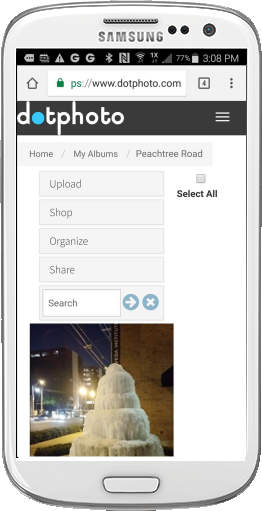
dotphoto runs beautifully on a phone from your browser. Here is a screen shot showing a photo of a frozen fountain that I took last week in Atlanta. On phones, your albums and images appears under the main command bar, and can scroll up and down. To see a larger photo of the fountain, you would tap the thumbnail.

Add a dotphoto icon to your Android phone

Add a dotphoto icon to your iPhone

Three ways to share to Facebook from dotphoto

1. Most phones share dotphoto images directly to Facebook. Hold your finger on the photo (“long-tap”) to reveal sharing options including Facebook.

2. Use dotphoto‘s Share feature. In the image on the right, you can tap the share button at the bottom of the list to reveal green buttons that copy either a link to the album thumbnails or a link to the dotphoto slideshow. Copy the link of your choice, and paste the link into your Facebook post.

3. Copy and paste an image. On your computer, copy the dotphoto image and simply paste it into your Facebook post. Facebook will downsize the image on Facebook for sharing, but you will still have the full-size version on dotphoto.

The best photo collections of 2017

We’ve assembled some of the best photo collections of 2017 from sports, space, fashion, history, science and culture.

Click for Christmas slideshow

National Geographic’s Best 57 Photos of 2017

Click for Christmas slideshow

Time Magazine’s Top 100 Photos of 2017

Click for Christmas slideshow

The History Channel:
How will history remember 2017?

Click for Christmas slideshow

Vogue Magazine’s Best Backstage Fashion Photos

Click for Christmas slideshow

NASA’S Top 17 Images of Earth from Space

Click for Christmas slideshow

Tom Jenkins’ Best Sports Photos of 2017

When your photos matter

During this season of memories, it’s worth remembering that dotphoto saves your photos at up to 36 megapixels (up to 6000 dots on the longest side.) Unlike our competitors, we don’t downsize our Club members’ photos to small storage sizes, so you’ll be able to zoom into group shots or print clear photos years from now.
party320
You can also download and backup your photos on dotphoto any time you want, which is difficult or impossible on most other services. How to download

dotphoto Club, Family and Pro members get free unlimited, high-quality storage and can manage photos in an easy album structure.

More on dotphoto’s storage policy

How our competitors think about your photos

As of 12/18/17, Facebook’s help section notes: “To avoid compression when you upload your cover photo, make sure the file size is less than 100KB.” This is a very small file for most dotphoto photographers. Most “free” photo sites severely downsize your images after a week and a year because their business models are based on printing or advertising. They are not designed to be services that care for your photos; they are designed to maximize advertising or printing, and they understand that your old photos will produce less revenue than your new photos, so they reduce their costs by severely reducing the size of your photos.