Two-year-old takes his truck on wild adventures

And Mom takes the shots

We all like to take photos of our kids playing and having a good time with toys and gadgets we get for them. We especially like it if we can join in on the fun and create a fun filled visual story. But, honestly, if you’re like me and my family it doesn’t happen all that often, but when it does it is a real treat for us and the folks we share our photos with.

Given that I like trying to create little photo stories, I was happy to run across this photo sequence created by a mom with her young son. Turns out she’s a pro photographer and I’m a rank amateur, but I am encouraged by what I see here and think with a bit of planning and practice I might be able to create a good story too.

Once I have the photos I want, the easiest part of my story creation will be creating a slideshow that friends and family will see. The slideshow story will automatically be available to view once I upload my photos into a dotPhoto Album and send the “Album Links to Image View” address to the folks I want to invite. When folks come to that address they will see the slideshow. Note that our pro photographer’s photos can be seen by clicking a link in the story, but there’s no slideshow like we can see on dotPhoto.

Getting back to our pro photographer, Alaina Carr; here are a few fun shots from her wild adventure story of her son, Miles, as it appears on the babble.com website. If this introduction catches your fancy click the link at the end of the blog to see more of the photos for yourself. From babble:

“In a photo series called “The Adventure of Miles,” Mile’s mother documents the daily adventures of the toddler and his Little Tikes Truck on her Facebook page. Despite the fact that Miles’ feet could barely even reach the ground while sitting in his truck a few months ago, the young cruiser has kept a steady pace of road trips in his plastic ride.”

Here’s Miles.

HeresMiles


As you can see, he’s raring to go!
But first a few stops, one stop at the drive-thru bank to make a deposit,

MilesBanking


and a second to get a bite to eat.

MilesGetsEats

See the rest of Mile’s story at: https://www.babble.com/parenting/the-adventures-of-miles-photo-series/. Then it’s our turn to create a photo story.

Walter
wkrieg@dotphoto.com
http://www.dotphoto.com
What is optical image stabilization?

Optical Image Stabilization (OIS) explained…

As we try to improve our photo taking…we work to make sure that our photos are clear and sharp with the proper resolution. We try hard to hold a steady hand as we snap our photos. But as we all know, that’s not always enough. If we can get the camera to help us it may make things a whole lot easier.

Help might be on the way. It looks like new cameras, even on our smart phones, might just be getting ready to do the job by not only adding a feature called Optical Image Stabilization but improving it immensely.

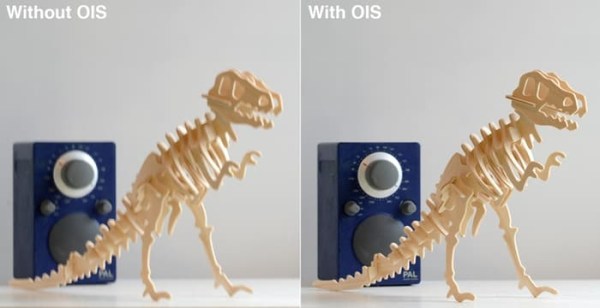
Optical Image Stabilization has been around commercially since the mid-90s when it started being used in compact cameras and SLR lenses as a method of letting photographers shoot longer exposures without needing a tripod. It works by moving lens elements to counteract wobbly hand-induced camera shake, thereby reducing blur.

Our writer tells us that not only are SLR and similar cameras coming equipped with improved OIS, but new smart phone models are as well. If this is true and, given our desire to use our smart phones for more and more of our photography, should we look forward to this feature as a true benefit?

and should my next smart phone have it?

Simon Crisp tells us…

“The cameras in our smartphones keep getting better as they gain tech and features previously reserved for high-end cameras. One such example is Optical Image Stabilization (OIS) which promises less blurry images and smoother video. Here we look at exactly what OIS is, how it works, and whether it’s a feature you’ll want in your next smartphone.” Let’s take a look…

Here’s what we might be able to look forward to

OISinSmartPhones


See more of what Simon has to say here: http://www.gizmag.com/what-is-ois-optical-image-stabilization/42212/
Walter
wkrieg@dotphoto.com
www.dotphoto.com
The photo tips that finally clicked

The Photo Tips That Finally Clicked And Made Me A Better Photographer

What should we concentrate on?

As we try to learn photography…we often feel that we can’t get it right. Is it us? Is it what we’re shooting? Is it the camera? Something else? We search for answers and today the Internet offers us many possible lessons and loads of articles to review and study. Our writer claims he spent much time and experienced much frustration before finally putting it together himself. If nothing else he works hard in this article to combine many lessons into one place so that we don’t have to search far and wide for answers on how to improve our photography. Let’s see what Thorin Klosowski has to tell us.

Thorin says

“In high school and early college, I wanted to be a concert photographer. I spent tons of money developing poorly-shot 35mm film from a cheap SLR camera. No matter what I tried, I couldn’t get the hang of it… Photography is hard, and nothing about it clicked, as it were.

I recently found a camera that both suits my needs and that I’ll actually carry around with me, the Sony RX100. As a bonus, I’ve also learned how to use the damn thing. A lot of different factors fell into place for this whole thing to stick, and I’m now able to enjoy it as a hobby. If you’re interested in photography too, don’t be me — start with these suggestions”

Quit Obsessing Over the Camera and Just Pick One You’ll Actually Use

PhotoTips1


Find Photographers You Admire, and Copy, Copy, Copy

PhotoTips2


And there’s much more. To see what else Thorin has to say follow this link. We think you’ll find it interesting, informative, and easy to follow along. http://www.lifehacker.com.au/2016/03/the-photo-tips-that-finally-clicked-and-made-me-a-better-photographer/

Walter

wkrieg@dotphoto.com


Take quality silhouette photos

If you’re like me you keep your eyes open for just the right conditions to take photos of attractive silhouettes…sunset especially is my favorite. As much as I like silhouettes I’m reluctant to take silhouette photos unless the light looks just right to me. For example, here’s one I took of Lady Liberty on a New York harbor crossing recently.

LadyLibertySilhouette

The light was coming from the west, that was the direction I was facing, and the sun had dropped below the horizon. I could see the shadow on the water in front of the statue. I thought these were ideal conditions so I snapped away, but somehow I didn’t get quite the result I was hoping for. I expected there to be more distinction between the background sky and the statue. And since I don’t get out on New York harbor very often I won’t soon have another chance.

Given this result, I began looking online for help with silhouette photography and found this article with tips on how to give myself a good chance at getting a silhouette photo I will be satisfied with. The author is Marc Schenker and here are a few of his tips and examples of his work.

Mark Schenker suggests

  • Choose the Time of Day
  • Get Yourself into the Best Position for the Shot
  • Adjust Your Camera Settings Accordingly

And a few more thoughtful suggestions that I believe will help me the next time I want to take silhouette photos.

Here are two of his silhouettes.

MarkSilhouette1


MarkSilhouette2


See what Mark has to say about silhouette photography in this article: https://contrastly.com/learn-how-to-photograph-silhouettes-the-easy-way/

And he does make it sound easy. I’ll be using his tips in the future.

Walter

wkrieg@dotphoto.com

High quality vacation photos with your mobile phone

Are you focused on high quality photos when on vacation?

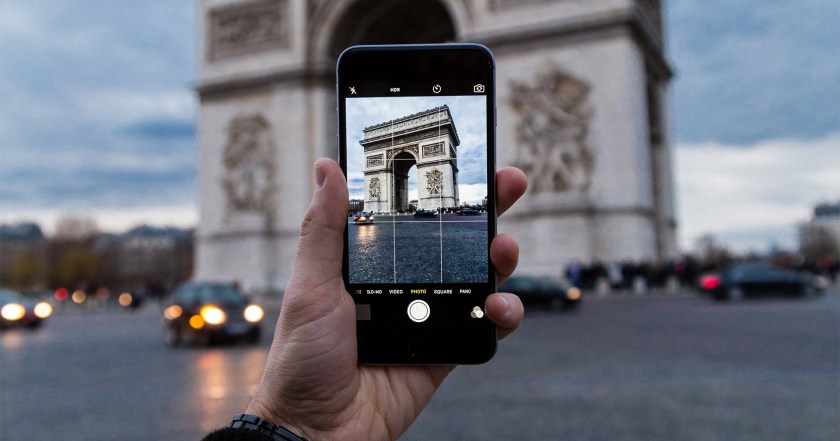
We here at dotPhoto work hard to take the best photos we can when we go off on vacation. Myself, I get my trusty DSLR ready and start practicing a week or so before we leave. What I’m beginning to think is unusual is that I take almost all my everyday photos with my camera phone and not my digital camera.

Of course when we have gatherings of friends and family or I attend our daughter’s basketball games I set the mobile camera app to auto and take dozens and dozens of photos and delete the ones I don’t like. But on vacation we go to different and interesting places and I’m afraid that unless I use the DSLR I just won’t get the quality of photos I desire and, unlike games and other gatherings which happen pretty often, I won’t get a second chance.

Recently I began seeing articles that said that the quality of cameras being built into phones was improving. Much of what I read was coming from the manufacturers so I had my doubts, but these articles put me on the lookout for more reviews and information. While hunting around I came across this piece by Karen Loftus telling me that I can rely on my mobile phone’s camera. So take a look at the results.

VacationPhotosWithMobile1

Did this photo get your attention? But it’s not mine it’s Karen’s. Karen interviewed a number of well respected photographers and here’s the first thing she learned.

  • Seriously, leave the DSLR at home.

And, there’s more for us to learn in this article that Karen Loftus penned. http://www.insidehook.com/nation/take-great-travel-photos-with-iphone-smartphone


Tiles help you take photos of small attractive products

Do you like to take photos of small attractive products…or gifts or items you buy for your home? Well we do, and it is always a challenge to find a good setting for the photo: the right table, the right surface, the right background…I think you know what I mean. Even professional photographers work hard to find an attractive way to photograph a product so that the product stands out.

To get a few ideas on improving our techniques we’ve been poking around and, as we searched we came across a pro with what we think are some truly good ideas for small products. See what you think.

Laya Gerlock explains…

Tiles Are a Product Photographer’s Best Friend

As a product photographer, I’ve always had a problem with finding what to use as a background. Even more so when I need to go to my client to shoot their products.

Before, I was limited to shooting on a black granite tile. Then I added some do-it-yourself wood planks into my props collection, but carrying the wood planks was a big problem, as they were too heavy and I could only limit myself to about 2 wood planks per shoot.

Fast forward a bit. I was in the hardware store to get something when I saw a piece of tile that resembled a rocky surface, which was perfect for a shot I wanted to create. Then my curiosity with different tiles was born.

TilesForPhotos

See more of what Laya has to offer here: http://petapixel.com/2016/03/01/tiles-product-photographers-best-friend/


Video games may make you a better photographer

Point-and-shoot or shoot-em-up

“It makes sense that photography would be a natural fit for video games. Over the last several console generations, controllers have been evolving to better accommodate first-person shooters: their twin joysticks enabling simultaneous movement and aiming and their shoulder buttons deliberately evoking triggers. Shooting a camera and shooting a gun—mechanically speaking—they’re not so different.” VideoGamesTeachPhotography2VideoGamesTeachPhotography

Finding the right video games to learn photography?

We all want to be better photographers…to be as good as we can be when those moments arrive. We study photos taken by famous photographers like Ansel Adams whose black-and-white landscape photographs of the American West, especially Yosemite National Park, have been widely reproduced on calendars, posters, and books — or Dorothy Lange who made her mark in photography during the Great Depression by taking some of the most moving and dramatic photos of people and conditions in that era.

Some of us think about taking courses, including many offered online.  We take our studies very seriously. And, if you’re like us here at dotPhoto, you probably would not even think of online video games when you think about improving your photographic skills.

Our writer seriously offers that possibility. With forward-looking schools beginning to use games to teach “soft skills,” he sees the hand eye co-ordination, the ability to focus, and the fundamentals of a good shot being similar in video games and real life photography.

Patrick Lee tells us…

“Woe to the medical student who plays Surgeon Simulator instead of studying and goes on to be sued for gross malpractice after accidentally sawing open a patient’s lungs. Rest in peace to the aspiring skater who, emboldened by Rob Dyrdek’s proclamation that playing Skate is equivalent to learning how to skateboard, jumps on a board for the first time and tragically breaks their spine in 11 places.

As far back as the ’80s, edutainment titles like Where In The World Is Carmen Sandiego? and Oregon Trail were teaching kids geography and history, and now forward-looking schools are beginning to use games like Minecraft to teach soft skills such as curiosity and communication. But we don’t often hear about games being used to teach technical skills or trades. Maybe that’s for a reason. If your house was burning down, would you trust a firefighter whose only training came from playing Super Mario Sunshine?”  Yet, at the same time, it makes sense that photography would be a natural fit for video games.”

See more of what Patrick proposes here: http://www.avclub.com/article/can-video-games-teach-you-be-better-photographer-237294

Using a Smartphone to take High Quality Photos

The Right Digital Camera

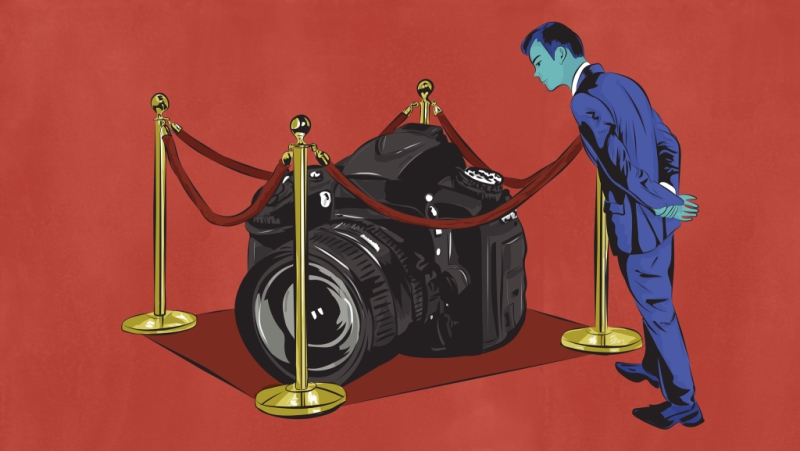
If you’re like us here at dotPhoto, since the beginning of the digital photography age we’ve always looked for the best digital camera that we could afford. Cameras with enough resolution, zoom, EVF, motion correction, and more. We have always just assumed that if you want professional quality photos you buy a quality digital camera.

Well maybe that’s no longer necessary. It may now be possible to take professional level photos with… your Smart Phone. Yes, that’s right, your Smart Phone. We’ve been using our Smart Phones for casual vacation and family photos for years now, but when we want to take high quality photos of products and the like we’ve always reached for our digital camera.

Lately we’ve been seeing and hearing that this may no longer be necessary…that Smart Phones may be more than enough. Of course we hear this from the manufacturers who, let’s be honest, want to sell their devices. But now we’re seeing articles, like the one referenced here from a professional photographer, that back up these claims.

SmartPhoneBlogPhoto1

Here’s an excerpt from an article by Ramon Ray: “I recently bought a professional digital SLR camera. While it certainly has some features that make photos look stunning and professional, you don’t need to shell out the money for a fancy camera… With a few effective tips, you can take professional photos to use on your site and in your marketing.”

One great way to improve your smart phone pics is to use dotPhoto’s free editing software for cropping, tinting and other special effects.  Info on the dotPhoto Editor

Ray’s Tipshttp://www.business.com/arts-and-design/6-ways-to-take-professional-photos-with-your-smartphone

dotPhoto recently released our Android dotPhoto App that you can download for free from the Play Store. Our iOS version for the iPhone is in testing now.

How a New Type of Filter Could Revolutionize Low Light Photography

Alex Cooke explains…

Low Light Issues…

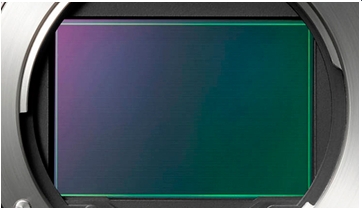
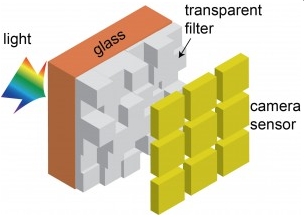
Color photography is great. There’s a problem, though: the way we give color information to a camera sensor makes them really terrible at low light performance. A team from the University of Utah may have the solution.

Most modern digital cameras use a Bayer filter to selectively filter incoming light into red, green, and blue components, using their relative amounts to assign overall color values. While this is a good system for color photography, it’s not so great for low light photography.


UtahFilter1st

https://fstoppers.com/gear/how-new-type-filter-could-revolutionize-low-light-photography-119028

Here’s the University of Utah’s bright idea for low light photography

University of Utah Electrical and Computer Engineering professor Rajesh Menon has developed a new camera color filter that lets in three times more light than conventional filters, resulting in much cleaner, more accurate pictures taken in lowlight. The new filter can be used for any kind of digital camera, but Menon is developing it specifically for smartphone cameras.  

UtahFilter

http://unews.utah.edu/bright-idea-for-lowlight-photography/

A Photo Web Site in Five Minutes

MyWebSitebutton

We recently updated dotPhoto’s My Web Site feature to make it easier to create an instant web site from your albums. Just click on the My Web Site button, add some text, and choose colors and albums. Click here for a step-by-step procedure or write to us if you’re a Club Member who would like us to set up your photo web site the first time — no charge — at makemywebsite@dotphoto.com.

Here’s a sample photo web site:

BillionDollarArtGallery

You can even “point” your domain name to your dotPhoto Web Site like this:  www.billiondollarartgallery.com

How can I use dotPhoto like Dropbox?

You can use the dotPhoto download tool to allow a friend to download the original files of one of your dotPhoto albums. Unlike Dropbox, dotPhoto does not require your friend to install special software or to join dotPhoto to download your photos.

The only limitations are:

  1. The download feature only works for an entire album. If you want to share a download for just one photo, create an album, copy the photo to that album, and share the download link from that album.
  2. Your friend must download the photos within about 4 hours. Download links expire after about 4 hours, and are not meant to be posted for broad distribution.

Here is how to get a download link that you can send to a friend:

  1. Sign in to dotPhoto
  2. Click on an album.
  3. Click on Organize on the left.
  4. Click on Download at the bottom of the list.
  5. Right-click on the Download button, and choose Copy link address.
  6. Paste the link into an email to send to your friend who can click the link to download your album.
    The link should look something like this (but this is not a working link): http://img.dotphoto.com/dl/1646017/6731598/1480715f72d439784g1f45a34f03e298/Album6731598.zip

dotPhoto Galleries are back!

Click on the Gallery button in the button bar to see dotPhoto public galleries:

GalleryButton

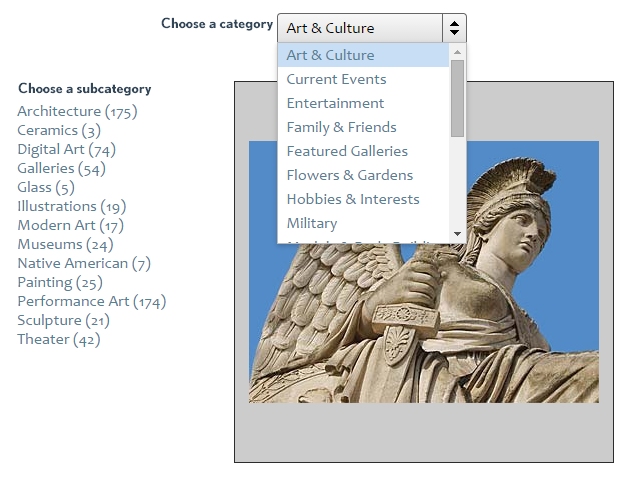
Choose categories and sub-categories to find the kind of photos you want to browse:

ChooseGalleries

Browse popular photos or create photo products as a guest. For instance, here’s a Hieronymus Bosch black mug from our Billion Dollar Art Gallery in Art & Culture / Painting:

HieronymousBoschMug

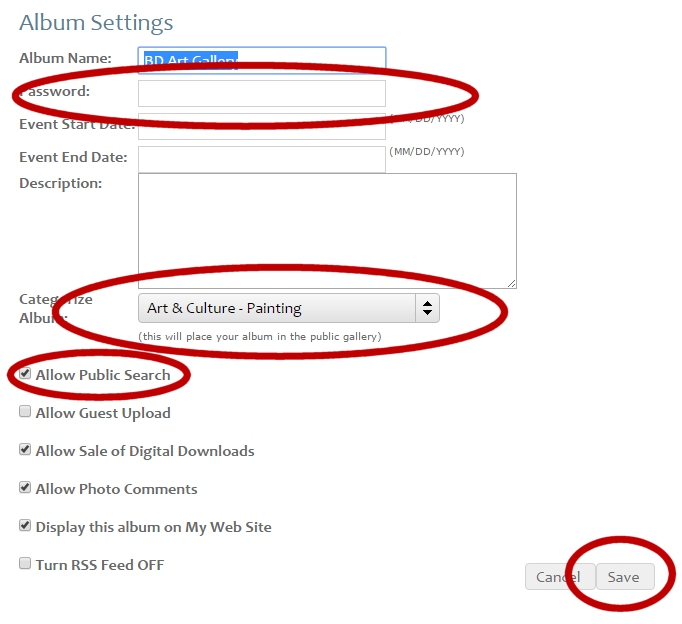
Add your albums to the dotPhoto Galleries:

Under album settings, remove the album password (if any), choose a category, and click the Save button.

AlbumSettings

What makes a photo memorable?

MIT explains…

Very memorable images
It seems that the weirder — or more surprising — the better. If you test humans to see what photos we remember, and then feed those results into a neural network, you can train a computer to find the most memorable photos.
The least memorable photos have few defining characteristics such as photos of fields, lakes and buildings like many you have seen before.

A few things that can make a photo memorable

  • Unusual angle
  • Odd facial expression

    Less memorable images
  • Anything surprising
  • Something that breaks the rules
  • An image that tells a story
  • Something threatening

Try uploading your own photos to get a memorability score.

Million dollar painting – now just $5 for Presidents Day

Washington Crossing the Delaware - Emanuel Leutze - 1851 - Metropolitan Museum of Art, NYC


George Washington risked everything to cross the Delaware River on Christmas Eve. Enlistments would expire at the end of the year, and, if the river froze, his enemies might walk across the ice and capture his starving army.

Click on the picture to download a high-resolution image of the famous painting by German American artist Emanuel Gottlieb Leutze. Add the file to your dotPhoto account and use coupon code POSTER to buy a 12×18 matte or glossy print on dotPhoto for just $5!


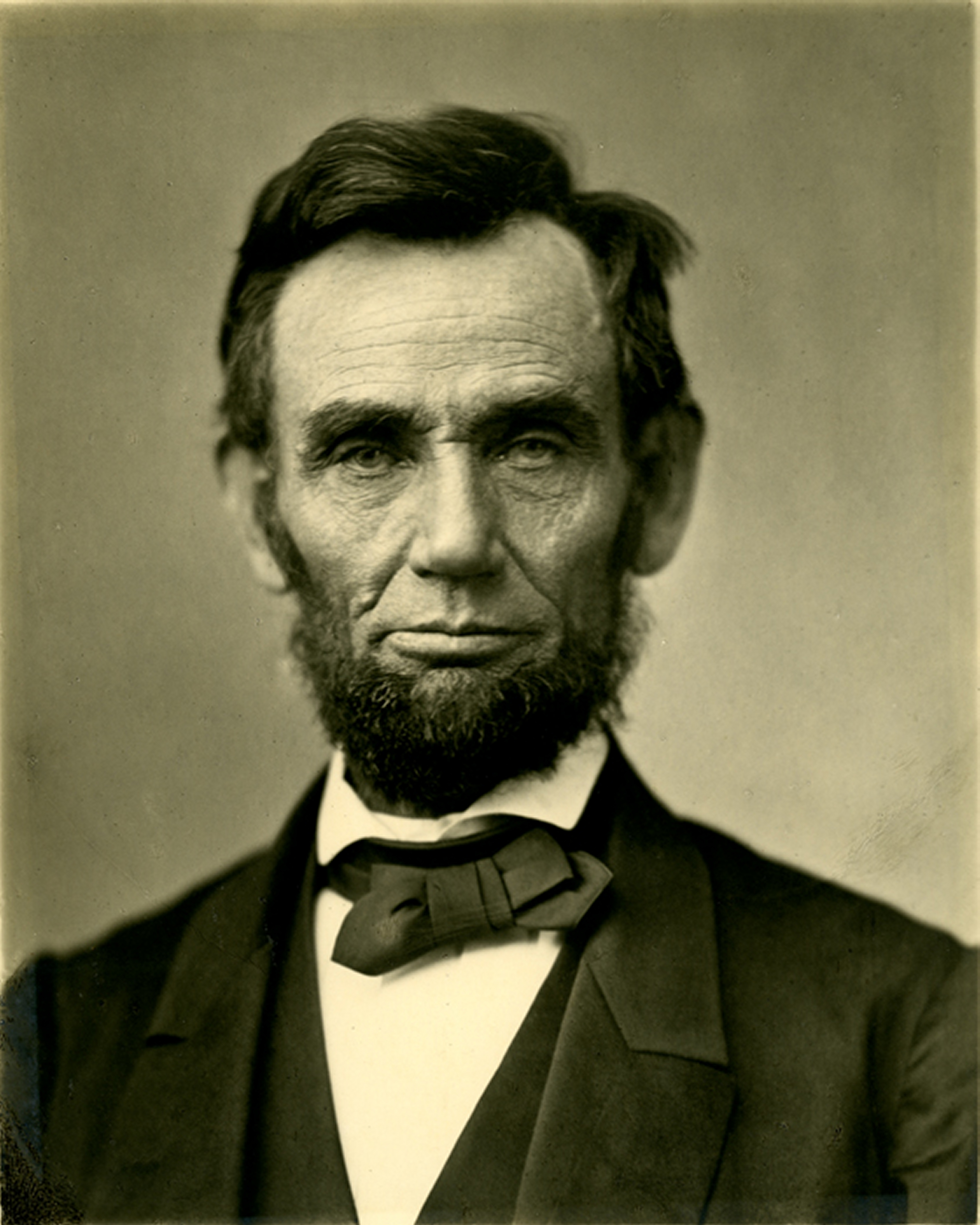
Abraham Lincoln 10 Days Before Gettysburg Address


The Best Picture of Lincoln

“A new birth of freedom”

Many scholars agree that this photo — taken just 10 days before the Gettysburg Address — is the finest portrait of Lincoln. Download your high-res Lincoln image by clicking on the photo, then upload to your dotPhoto account and use coupon code FREEDOM to get your 12×18 poster for just $5.

How do I order a poster?  Click here for step-by-step procedure.


dotPhoto Mobile, new Android app

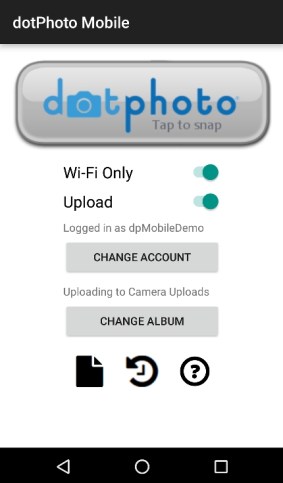
dotPhoto Mobile is a our new app for Android phones that makes it easy to upload pictures from your camera phone or tablet to dotPhoto. You can even take pictures by tapping the dotPhoto logo. You can save on data streaming by uploading pictures only when Wi-Fi is available, and you can upload automatically or whenever you prefer.

The app is free. To install it on your phone, go to the Google Play Store and search for dotPhoto Mobile or click on this link:

https://play.google.com/store/apps/details?id=com.dotphoto.photouploader

Android Requirements

4.1 and up

dotPhotoMobileHomeScreen

To take a picture

Tap the dotPhoto logo button to enter your phone’s camera mode. Take a photo; if you like the photo, tap OK. If not, tap the Retry button. Once you approve the photo, it is added to the upload queue. If you have more than one camera, you may be asked to choose an app for selecting photos.

Wi-Fi Only Switch

Slide the Wi-Fi Only switch right to ON to allow uploads only when Wi-Fi is connected. This switch does not appear on Wi-Fi Only devices. To upload using your phone’s data plan, slide the Wi-Fi only switch left to OFF. dotPhoto Mobile will choose Wi-Fi when it is available, and your phone’s data plan when Wi-Fi is not avaiable.

Upload Switch

Slide the Upload switch right to ON to allow uploads. If Upload is OFF, then photos are added to the upload queue, but are NOT uploaded until you slide Upload to ON.

Change Account

Tap the Change Account button to upload to a different dotPhoto account.

Change Album

Tap the Change Album button to upload to a different Album in your dotPhoto account.

Upload from your Phone’s Photo Gallery

The Gallery icon is the paper with a turned-down top corner. Tap the Gallery icon to see a gallery of photos on your phone. Depending on your Android version, there are several ways to select multiple photos. For the most recent Android versions, press and hold photos to select them. Older Android galleries have check boxes, and some early versions limit you to selecting one photo at a time. You may also be asked to choose which app you want to use for selecting photos.

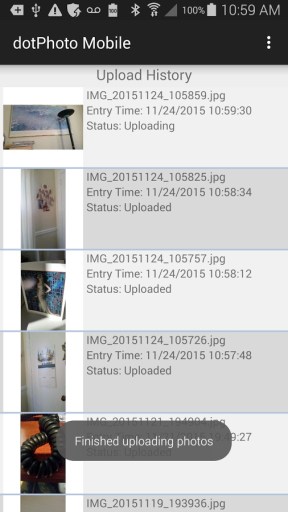
See your Upload History

The Upload History icon is the clock with the arrow around it. Tap the Upload History icon to display a list of photos that have been uploaded or are in the process of uploading to your dotPhoto account.

UploadHistory